Key takeaways
- Robinhood Legend is Robinhood's free desktop platform, linked to your normal account, built for charts and options.
- Build one layout for options: watchlist, chart, options chain and positions, with the chart and chain linked.
- Add open interest, volume, IV and the Greeks to the chain so you can spot liquid strikes at a glance.
- Use simulated returns to see how a spread's profit and loss changes as time passes and IV moves.
Before you start: read Trading Options 101 and Option Greeks 101 first.
If you trade options on Robinhood and you’re still doing everything in the phone app, you’re making life harder than it needs to be. Robinhood Legend is Robinhood’s desktop platform, and once you set it up properly, you can see your chart, the full options chain, your positions and orders all on one screen.
In this guide I’ll walk you through how I set up Legend for options trading, the features I use every day, and a couple of newer ones that make it even better.
What is Robinhood Legend?
Legend is a completely separate platform, built from the ground up, but it’s linked to your normal Robinhood account. Same money, same positions. You open it from Robinhood on the web and it launches in a new browser tab.
And it’s free with your Robinhood account. A lot of other charting platforms charge a subscription for the indicators and tools you get here. That alone makes it worth setting up.
Setting up your layout
When you open Legend, you can start from a blank layout or from a template. Templates are fine to look around, but I’d build your own options layout. It takes five minutes:
Step 1 of 5
Open Legend and start a blank layout
Log in to Robinhood on the web and click Robinhood Legend. Click the plus icon and choose to start from scratch. Check the account selector at the top too, so you're trading in the right account. I have an individual account and a Roth, and it's easy to be in the wrong one.
Step 2 of 5
Add your widgets
Click Add widget and add the four I use: a watchlist, a chart, the options chain and positions. Add orders too if you have the space. Drag the corners to resize. I make the chart and the chain the biggest.
Step 3 of 5
Link the chart and the chain
Each widget has a small colored dot, the link color. Give the chart and the options chain the same color. Now when you change the ticker in one, the other follows. Give a widget a different color and it stays independent, which is handy with multiple screens.
Step 4 of 5
Set up the options chain columns
Customize the chain's columns and keep what an options trader actually needs: bid, ask, volume, open interest, implied volatility and the Greeks. Remove anything you don't use. You can also change how many strikes show, 12 or 24 for example.
Step 5 of 5
Add your indicators and save it as a tab
On the chart, add the indicators you use. I always add Bollinger Bands, because they show the range a stock is trading in. Your layout opens as its own tab, so you can keep one tab for options and another for stocks, and switch between them without one changing the other.
Here’s what that looks like once it’s together:
Reading the options chain in Legend
If you’re used to the Robinhood app, the chain in Legend looks different at first. It’s the classic chain you’ll find on most other brokers: calls on the left, puts on the right, strikes down the middle, and the in-the-money side shaded.
The big win is that you see everything at a glance. In the app you have to tap each strike to see its price. Here, with open interest and volume as columns, you can spot the most liquid strike in a second. When I looked at Apple, one strike had over 10,000 contracts of open interest and the highest volume. That’s the strike where your orders get filled at a fair price.
Placing a spread straight from the chain
This is my favourite part. To place a spread, you don’t go through five screens. You click sell on one strike and buy on the next, and Legend builds the two-leg order for you.
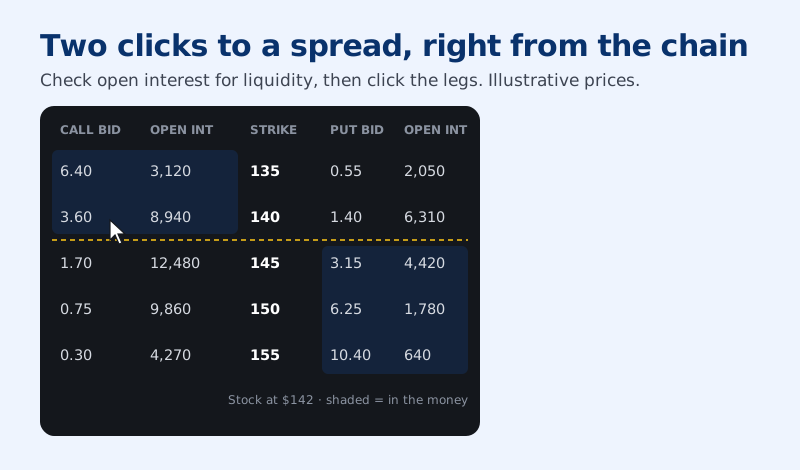
Then set your limit price, review and submit. That’s it. Spreads need Level 3 options approval on Robinhood. And one thing I’d love Robinhood to add here: the app shows you a profit and loss graph when you build a trade, and the order ticket in Legend didn’t at first. That’s where simulated returns come in.
Newer features worth knowing
Robinhood keeps improving Legend. It’s still not quite at the level of the platforms built for day traders, but it’s getting there. Two additions I use:
The focused chain
If you prefer the way the chain looks in the app, click the three dots on the options chain widget and choose Focused chain. It shows one expiration at a time, just like the app.
The nice trick is to use both. Keep the classic side-by-side chain in one widget to scan all the expirations, then use a focused chain in a second widget once you know which expiration you’re trading.
Simulated returns and the Greeks
This one is great for multi-leg trades. Build a strategy on the chain, say an iron condor, and click Simulated returns. You get a profit and loss graph with the combined Greeks for the whole position.
Then there’s a date slider. Move it forward and you see how the position’s profit changes as time passes, with theta working for you if you’re the seller. There’s an IV slider too, so you can see what happens if implied volatility jumps or drops tomorrow.
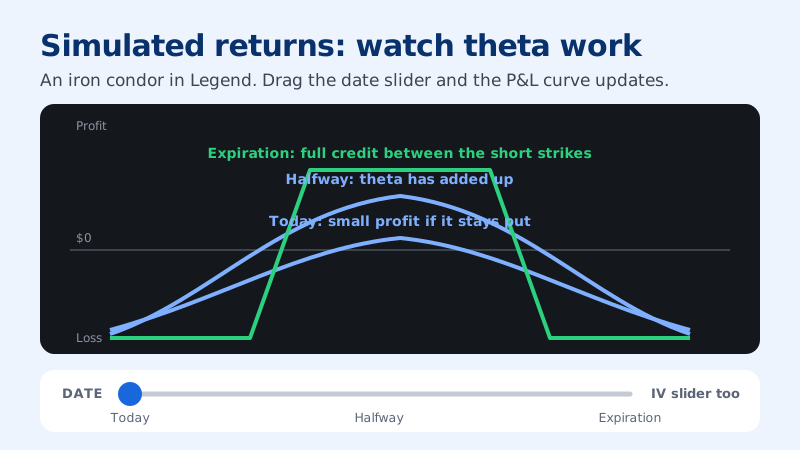
Before you place a trade, play with those two sliders for a minute. It teaches you more about how the Greeks actually move an option’s price than any definition will. If you want the basics first, start with my option Greeks guide.
My Legend options checklist
Is your Legend set up for options?
You're all set. Everything you need on one screen.
If you trade options seriously, Legend is worth the five minutes it takes to set up. If you have any questions about a specific feature, put them in the comments on the videos and I’ll answer.
FAQ
Is Robinhood Legend free?
Yes. Robinhood Legend comes with your Robinhood account at no extra cost, including the charts, indicators and options chain. It opens in your browser and uses the same account and buying power as the app.How do I open Robinhood Legend?
Log in to Robinhood on the web and click Robinhood Legend. It opens in a new tab as a separate platform linked to your account. From there you can start from a blank layout or a template.Can you trade options spreads on Robinhood Legend?
Yes, if your account is approved for Level 3 options. In the options chain you click sell on one strike and buy on another, and Legend builds the two-leg order for you to set a limit price and submit.What is the focused chain in Robinhood Legend?
It's a newer view of the options chain that shows one expiration at a time, like the Robinhood app. You can keep the classic side-by-side chain in one widget and the focused chain in another.Check your understanding
Written by Abhi
I'm Abhi. I've invested in US stocks for years, and for the last five to six years options have been at the heart of how I trade. I started AD Finance to break complex options concepts into plain-English guides, so you can trade with confidence, and I built OptionsVault to track my own trades.
This guide is for education only and is not financial advice. Options trading involves risk. Read the full disclaimer.